Solutions · Enterprise

One policy. Every site.

One security standard on every gate, enforced the same way and audit-ready.

Set the rules once. Push them everywhere. Override per-site when local conditions require it. Audit the whole chain.

One
dashboard for every site and gate
90+
gate and barrier brands
Under 1s
plate read to authorized
Who runs GateGuardX at scale

Built for the way a portfolio actually runs.

  • Logistics & 3PL networks, standardize gate access across every DC, yard, and cross-dock.
  • Industrial & commercial real-estate portfolios, one way to manage entry across every property, with control at each one.
  • National retail, manufacturing & energy, a consistent entry policy across sites, shifts, and contractors.
  • Corporate & campus security, central oversight, with per-person permissions for local teams.
Enterprise-ready

Enterprise-grade where it counts.

Per-person permissions, fully audited

Admin and user roles scoped per company and site (a site manager sees only their gates while HQ oversees the portfolio) with every action recorded. Company-wide single sign-on (so staff use your existing work login) is on the enterprise roadmap.

Secure by default

Encryption in transit and at rest, an NDAA-compliant camera built in an approved country, and plate recognition and gate decisions that run locally at the gate. Cloud features power dashboards, sync, reporting, and remote management — and a site can run fully local, with no event upload, for up to 30 days.

Audit-ready

Every access and every change is attributed and logged, with audit records available for compliance reviews.

Backed by guaranteed response times

Enterprise support contracts include 24/7 help and guaranteed response times based on how urgent the issue is, live status across every site, and one place to escalate problems for your whole network of gates.

Multi-site

Every yard you run, one screen.

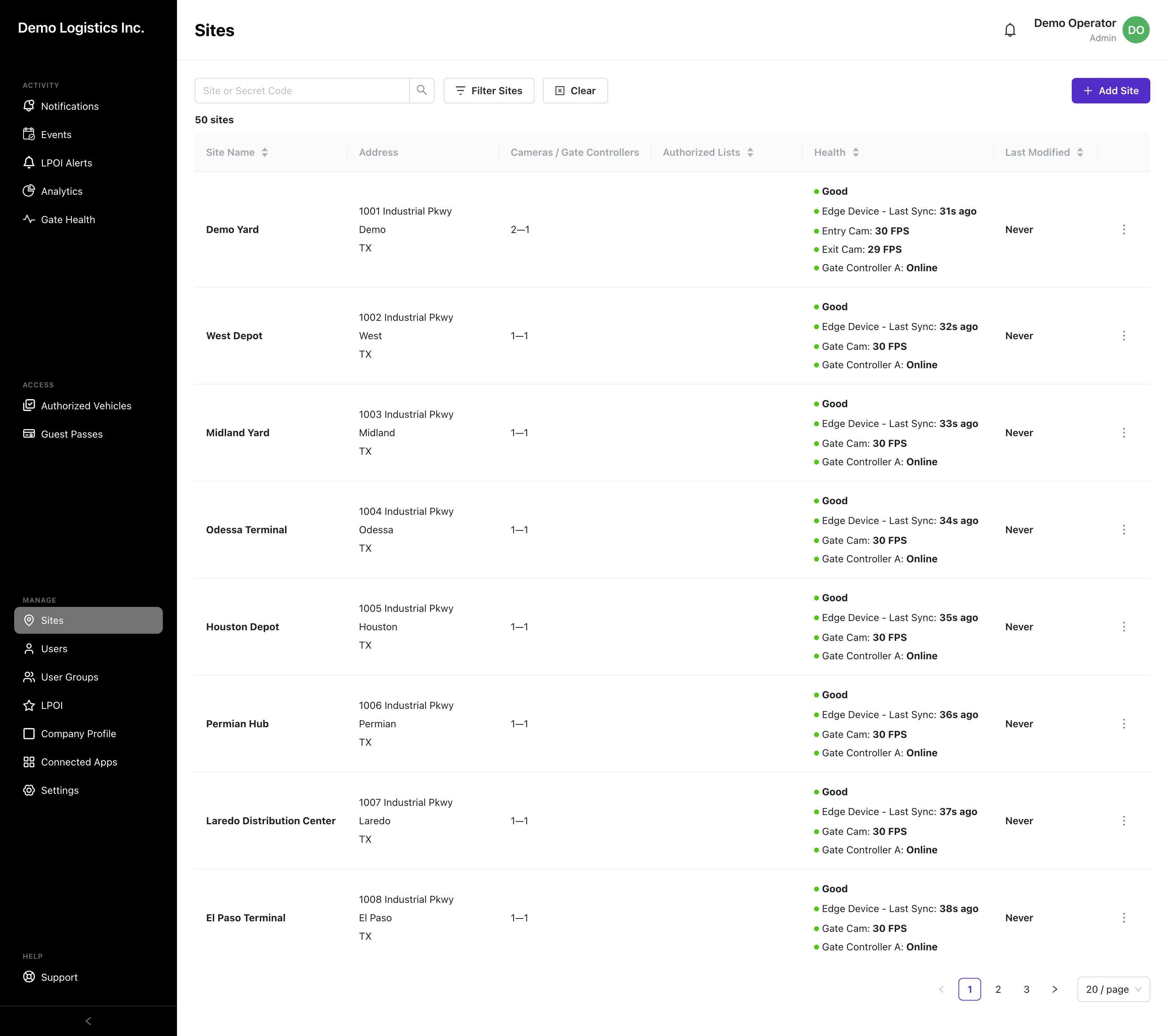
Every site you run in a single list, switch between them, or oversee the whole portfolio at once.

  • Each site carries its own address, cameras, and gate controllers
  • Live status on every row: the on-site unit, the cameras, and the gate controller
  • Green means go, across the entire fleet, at a glance
Every yard you run, one screen.
What changes

The comparison isn’t us against another vendor. It’s one standard against however each site does it today.

The portfolio today
  • Every site does access its own way — different hardware, different rules, different people holding the list.
  • You find out a gate is down when someone at the site calls to tell you.
  • Removing a contractor means contacting each location and hoping it happened.
  • An audit means collecting logs from a dozen places, in a dozen formats.
  • A new site starts from scratch, because there's no standard for it to inherit.

That’s the portfolio today. The rest of this page is the standard that replaces it — site by site.

The software

Run a portfolio of gates like one system.

The actual product, on a fifty-site demo company, centralized where it should be, per-site where it matters.

Fleet reliability

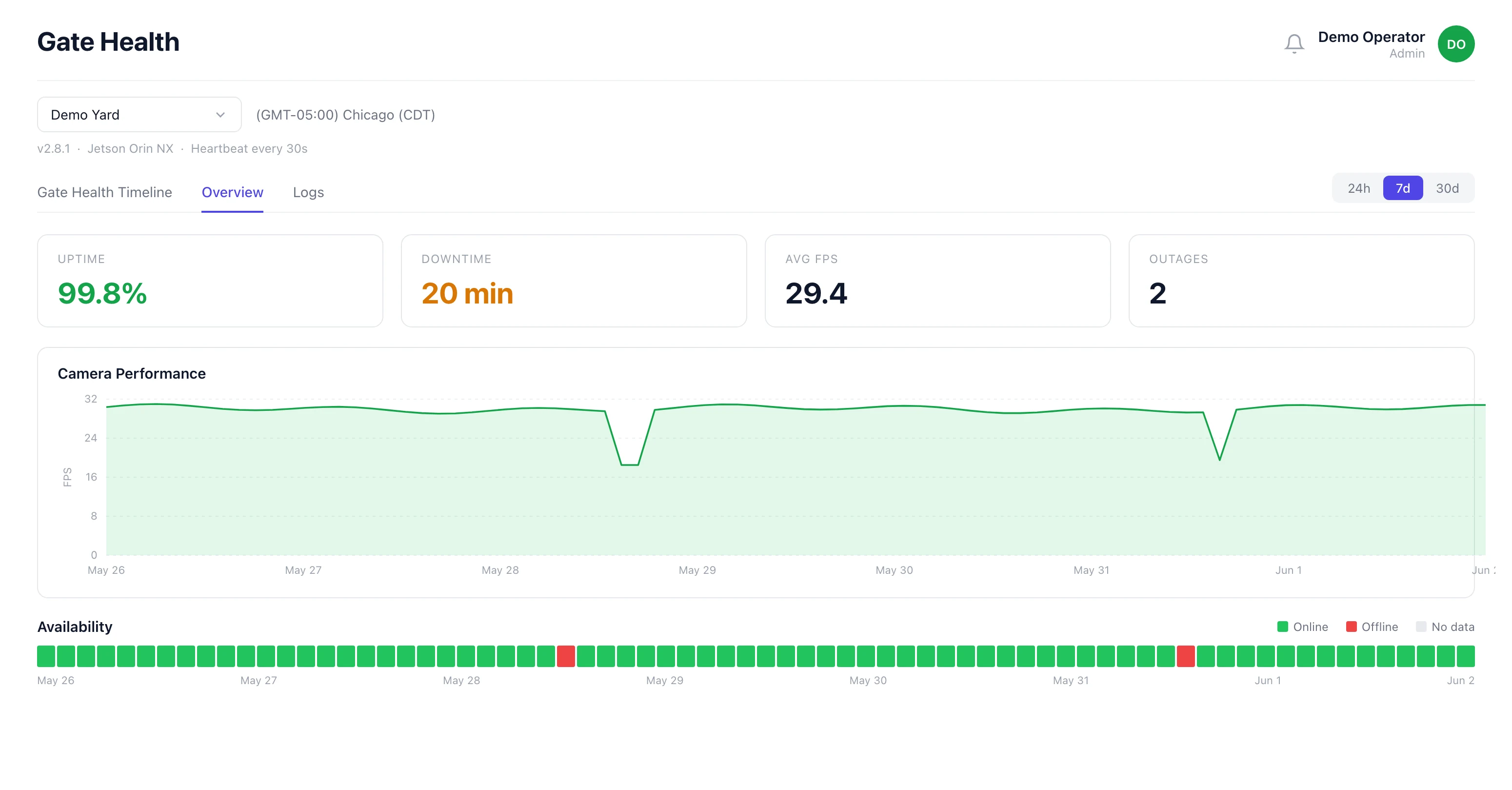
Every gate's health, on one screen.

See whether each site is up, whether its cameras are working, and when it last checked in. A gate that's gone offline shows up here, not in a phone call from a yard.

  • Per-site uptime and camera-status history
  • Outage alerts the moment a gate drops
  • Device + camera status across the portfolio
Every gate's health, on one screen.
Central policy

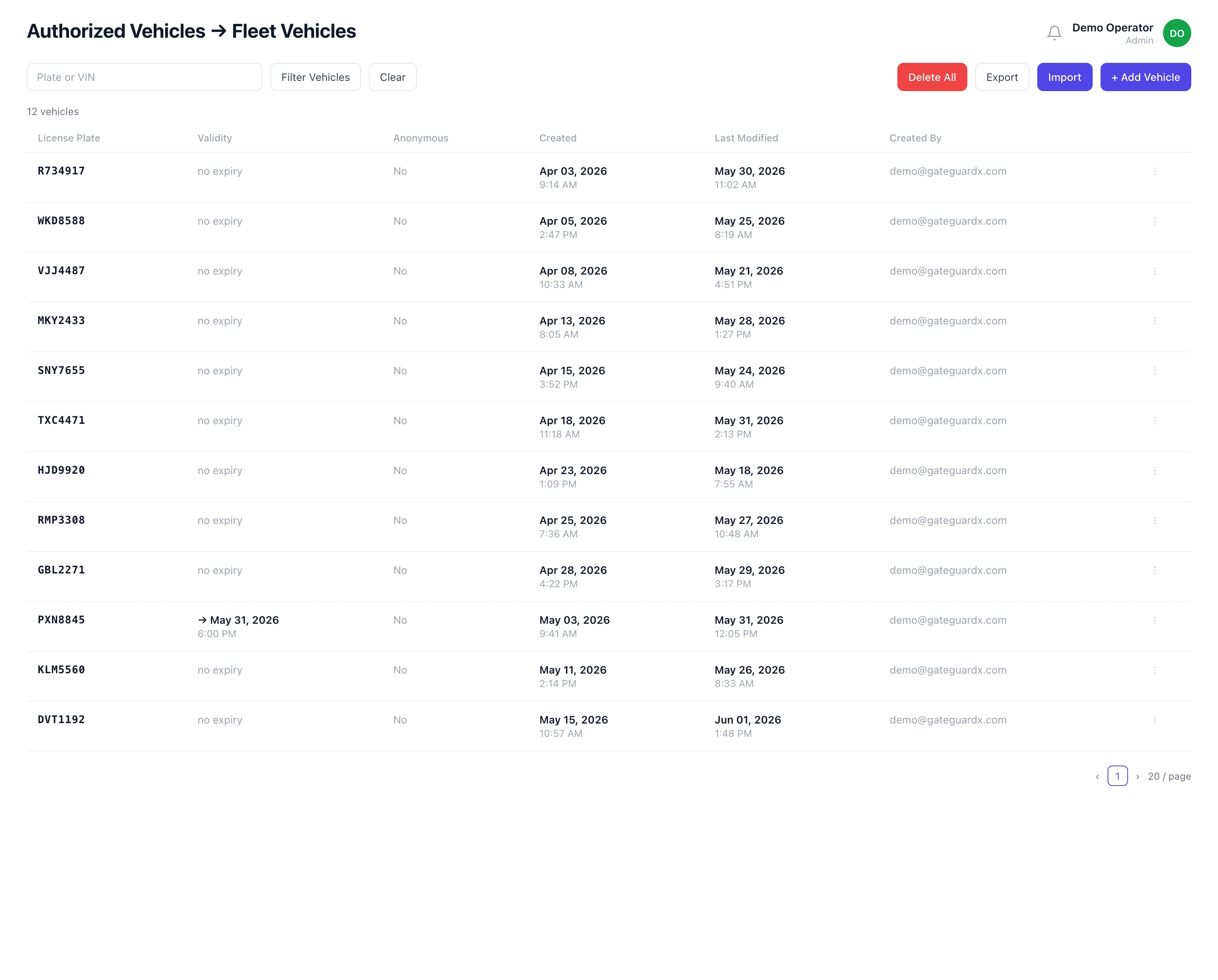
Set access once. Push it everywhere.

Authorized-vehicle lists with their own schedules and site scopes, managed centrally, overridden per site when local conditions require it.

  • Lists scoped to sites, days, and hours
  • Import a whole list from a spreadsheet; remove access instantly at every connected site
  • Every change stamped with who made it, and when
Set access once. Push it everywhere.
Your stack

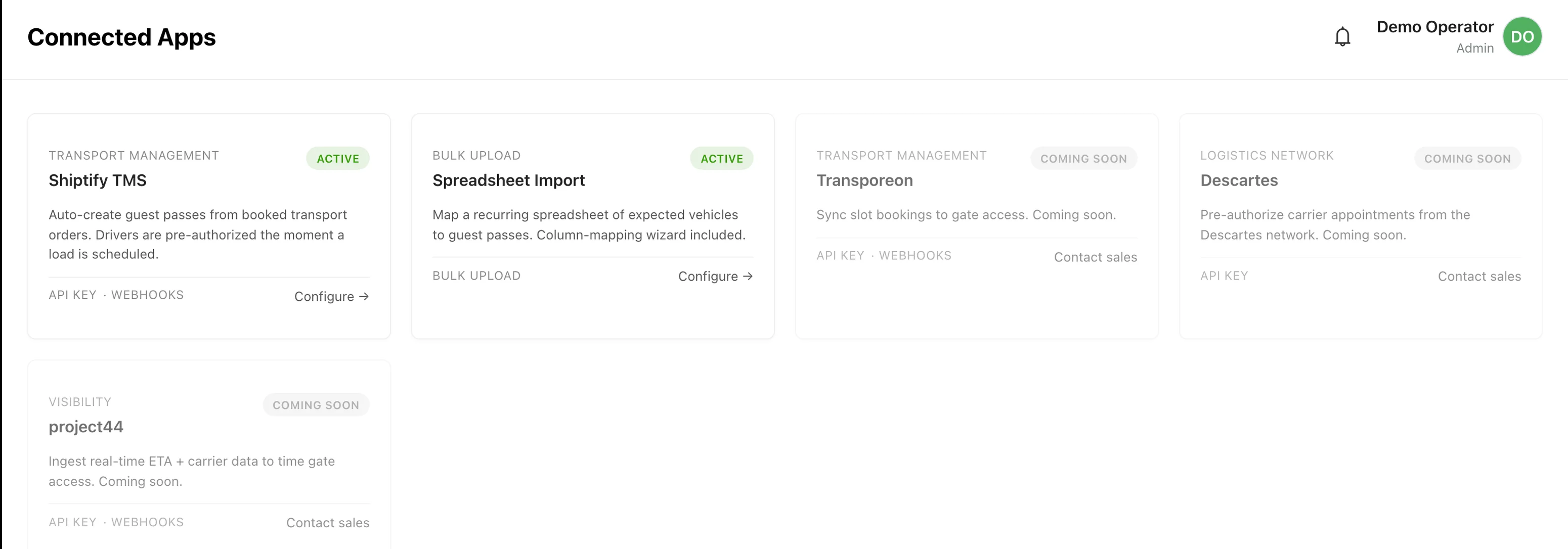
Plug into the systems you already run.

Connect your transport software or a recurring spreadsheet and gate access stays in step with operations, with nothing entered twice.

  • Shiptify transport software + spreadsheet import
  • Developer interface (API) + signed webhooks
  • Custom integrations on request
Plug into the systems you already run.
Onboarding

Onboard a whole fleet in one paste.

Drop a CSV or paste a plate column from your spreadsheet and every vehicle is authorized in a single step.

Team onboarding

Onboard your whole team in one paste.

Drop a CSV or paste an email column from your spreadsheet and everyone gets access in a single step. Pick their group, and they’re in.

Access policy

Push one list to every site.

Build a list once (its own days, hours, and gates) then roll it out across the sites that need it in a single step.

Questions enterprise teams ask
Does it support single sign-on and per-person permissions?
Per-person permissions are built in: admin and user roles scoped per company and site, with a full audit trail on every action. Company-wide single sign-on (SSO) is on the enterprise roadmap; today, enterprise deployments use per-person logins with role-based permissions. Tell us your login system and we'll plan SSO with you.
How do we roll it out across dozens of sites?
Site by site, on the gates you already have, about half a day per gate, no rebuilds. Most portfolios pilot a few sites, lock a standard policy, then roll the rest out on that template, with remote support at every commissioning.
Will it pass our security review?
It's built for it: AES-256 at rest and TLS 1.2+ in transit, an NDAA-compliant camera, per-person logins with role-based permissions, and plate-reading that runs at the gate, so recognition and gate decisions never depend on the cloud. Access events sync to your dashboard over TLS 1.2+. We support your vendor security and compliance review with documentation and audit-ready exports.
What happens at a site that loses internet?
Gates keep opening on the cached local access list — a site can run fully disconnected for up to 30 days — and every event syncs automatically when the connection returns. Recognition and gate control run on-site, not in the cloud — a network blip never strands a gate.
How does it fit the systems we already run?
It connects to your other software two ways: a full developer interface (API) for custom links, and a ready-made Shiptify connector and spreadsheet imports (more connectors in progress), so access stays in step with operations, with nothing entered twice. We share the full API reference during evaluation.
Who manages it, and how is access governed?
Your operations or security team, from one dashboard, central policy with per-site overrides, every change attributed and logged. No technical expertise required, and nothing happens at a gate that your rules didn't allow.

How a rollout works

From your site list to a standardized fleet.

  1. 01
    Send your site list

    Locations, gate types, and how access works today. We scope the portfolio and come back with a plan, usually within 48 hours.

  2. 02
    Pilot a few sites

    Commission a handful of gates on the barriers you already have, prove the policy and the integrations, and set your standard.

  3. 03
    Standardize the policy

    Lock one access template (lists, schedules, roles, overrides) that every new site inherits on day one.

  4. 04
    Roll out the fleet

    Bring the rest of the portfolio online on that template, with remote support per site and one dashboard over all of it.

Get started

Run every site from one screen.

One policy across the whole portfolio, per-site overrides where local conditions require it, and an offline gate that surfaces on your dashboard, not in a phone call from a yard. Send your site list and we'll scope it, usually within 48 hours.

  • 30-day money-back guarantee
  • 1-year hardware warranty
  • No gate replacement
  • Compatibility answer in 48 hours